Resource Packet for New Students
OAA Testing Center
The OAA Testing Center provides exam proctoring by reservation only for students with approved testing accommodations. Services are available Monday through Friday, 8:30 a.m. – 4:00 p.m.
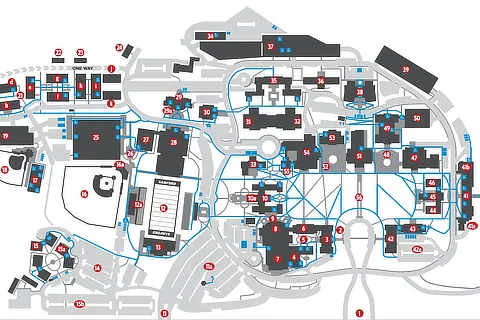
The Testing Center’s main desk is located in Dwight Beeson Hall, Suite 201.
Students are strongly encouraged to submit testing requests at the beginning of the semester when exam dates are listed in the course syllabus, or as soon as exam dates are announced.
- Reservations must be submitted at least one week prior to each exam.
- Final exam reservations must be submitted by the published deadline each semester.
When a testing room reservation is approved, the course instructor will receive an email confirming the exam details.
Please note: OAA provides computers, software, and/or technology only when required as part of an approved accommodation. Any additional technology required by the instructor must be provided by the instructor or the student.
Testing Center Overview

Testing Rooms
The OAA Testing Center offers a variety of testing spaces based on accommodation eligibility and availability, including:
- Private testing rooms
- Semi‑private testing rooms (1-5 stations)
- Group testing rooms (5-10 stations)
All testing spaces are designed to reduce distractions and are monitored by trained proctors either in person or through live video monitoring. Rooms typically include:
- Sound machines
- Earplugs and/or headphones
- Spaced testing tables
- Reduced room capacity (approximately one‑third of standard occupancy)
Students should immediately notify the proctor if excessive noise or other environmental concerns arise during testing.
Testing Room Reservations
Once you have confirmed with your professor that your exam(s) will be proctored through the OAA Testing Center, you must submit a separate exam request for each quiz, exam, or final through the OAA Portal.
Students are encouraged to:
- Request all known exam reservations at the start of the semester, or
- Submit requests as soon as exam dates are announced
Reservation deadlines:
- At least one week prior to each exam
- By the published deadline for final exams
After your exam request is approved, you will receive a confirmation email with the testing location, building, and room number. Students typically check in at the main desk in Dwight Beeson Hall, Suite 201 on the day of the exam.
A step‑by‑step tutorial video is available to assist with submitting exam requests.
Testing Policies
- Check-In: Students are expected to check-in for their test 5-10 minutes prior to the start time at the check-in desk. Testing time will not be extended past the originally scheduled end time due to a late arrival. Students may or may not be allowed to begin their exam if arriving late.
- Proctoring: Testing rooms are actively monitored during testing. Proctors monitor rooms either in-person or through live video-recording cameras. (Past recordings are maintained for a set length of time.)
- Technology: All phones, watches, and ANY unauthorized technology must be off and inaccessible at all times during testing unless pre-approved by the proctor. Phones and watches cannot be left in pockets or near your testing station.
- Belongings: All backpacks, bags, and other personal items must be sealed and inaccessible to the test-taker, but viewable to the proctor at all times during testing unless pre-approved by the proctor.
- Scratch Paper: All scratch paper must be provided by the proctor and left on your testing station when testing is complete. Accessing your own scratch paper or removing scratch paper from the testing room is not permitted.
- Breaks: Breaks will notadd additional time to your exam. Breaks should be taken in the testing room when possible. No items should be removed from the testing room or accessed during a break. All restroom breaks must be taken in the nearest accessible restroom.
- Questions: Please alert the proctor immediately of any disturbances, technical issues, or medical concerns, or if you have any questions or concerns about your test or any pre-approved accommodation(s).
- Academic Integrity: The University’s Academic Integrity Policy, as stated in the Academic Catalog, applies to all students testing in the OAA Testing Center. OAA proctors will follow the instructions indicated by faculty per the Testing Contract. Students are expected to comply with all instructions given by OAA proctors and staff. All irregularities and policy violations observed during testing will be reported to the course instructor for review. OAA Testing Center staff do not make determinations related to academic integrity.
- Missed Exam: Students are expected to notify OAA of a room cancellation as soon as possible and are responsible for rescheduling their exam. Students must receive professor approval when rescheduling with OAA. If a student is ill during a test and cannot continue, the student is responsible for notifying the proctor and the professor. Missed exams will be handled by the professor according to individual course policy.
University Library Lab
The University Library Lab is located on the lower level of the University Library. Hours of the lab are the same as library hours. Assistive technology provided in the lab includes text scanning, screen magnifiers and text magnifiers. Adobe Acrobat Reader 6.0 is available on all 42 computers in the lab to listen to PDF files. Students should bring their own headphones or check out a pair at the circulation desk of the library. Students who are registered with Accessibility and Accommodations are strongly encouraged to use this lab. Students who need access to assistive technology not listed above are encouraged to contact Accessibility and Accommodations.
Assistive Technology
Assistive Technology is all around us! Many of the tools available are free or cost very little to use. On the following pages are lists of Assistive Technology tools you may find useful when completing various tasks both in or out of school. Many of these tools may help you complete tasks more quickly, easily, or independently. Tools are broken down into sub-categories such as Reading, Writing, or Notetaking, for example. All apps and programs on the following pages are free or cost less than $25.
We do our best to stay updated on the latest information about the apps on the following pages along with adding the latest and greatest apps as soon as they come out. If you find an error in our listing or want to share a program, software, website or app that we should add, please contact: access@samford.edu
Additional Campus Resources
Office of Civil Rights
The Office of Civil Rights (OCR) is the agency that enforces federal civil rights law, including ADA and Section 504 of the Rehab Act. Their website contains helpful information regarding the rights and responsibilities of students with disabilities. The links below may be helpful to address frequent questions, concerns, and misunderstandings about accommodations in postsecondary settings
Faculty Guidance
The Office of Accessibility and Accommodations (OAA) serves as a resource for both students and faculty. Working in partnership with faculty, staff, and administration, OAA promotes an accessible and inclusive learning environment and supports equal access for students with disabilities. Faculty play an important role in the accommodation process, and the guidance document below outlines key responsibilities, procedures, and best practices for implementing approved accommodations. OAA staff are available to answer questions, provide consultation, and assist with accommodation-related concerns.